Dive into DD4hep
- Author:
yong
1 Disclaim
This document is meant to be used as a supplement of the official ``DD4hep` user manual <https://dd4hep.web.cern.ch/dd4hep/page/users-manual/>`_, hoping to provide
more details on how things are done in DD4hep.
The material presented in this document is from my learning notes, including most diagrams.
Some images are copied from the official user guide and some summaries are from the source comments wherever they
serves better to give an insight into the internal mechanism.
The document does not try to replace or duplicate the content of the official user guide, which gives a better overview.
User should always start from the official user manual and use this as a reference for better using DD4hep or just
for curiosity about the internal plumbings.
DD4hep is like a gold mine for me, from which I learned a lot about modern C++ programming idioms and how to build
a flexible library.
Thus, a collection of these idioms is shown in the last section of this document.
2 DDCore
2.1 Detector description
2.1.1 Overview
Detector description is represented by Detector class.
This class (the instance of the class, more precisely) is the entry point to build and use geometry in DD4hep.
Other features in DD4hep are built around Detector, like building, updating and using.
Detector only deal with top-level elements (i.e. the subdetector level) in the geometry tree hierarchy.
The geometry manipulation inside each subdetector is dispatched to the DetElement corresponding to each
subdetector recursively.
Geometry tree hierarchy is built upon TGeo package from ROOT, but convertible to Geant4 geometry with DDG4.
A second logical DetElement tree hierarchy is associated with the primary geometry tree.
DetElement node is directly attached to a geometry node, but not to replicate all levels of the tree.
Detector can be converted to Geant4 geometry model for simulation internally.
The main persistency format is xml, but native ROOT TGeo geometry and GDML geometry are supported as well.
CAD model can be imported into geometry tree with DDCAD.
2.1.2 Design
Detector is an interface class (abstract), the only implementation [1] is DetectorImp.
DetectorImp has a clear separation of inernal components using C++ multi-inheritance.
Detector as interface for client to use, DetectorData as internal data storage and DetectorLoad to parse xml.
DetectorImp also inherits from TNamed, thus has ROOT I/O support (a default constructor needed).
DetectorImp is neither copiable nor movable.
Each DetectorImp instance has its own TGeoManager, which becomes gGeoManager immediately
after creation (or there is only one DetectorImp instance in the system).
Alternatively, its TGeoManager can be accessed on instance basis using:
virtual TGeoManager& manager() const
2.1.3 Access Detector instance
Detector objects can be centrally managed, or self-managed:
//1. central-managed, native
static Detector& Detector::getInstance(const std::string& name="default");
static void Detector::destroyInstance(const std::string& name="default");
// central-managed, plugin
dd4hep::PluginService::Create<void*>("Detector_constructor",name);
// 2. self-managed
static std::unique_ptr<Detector> Detector::make_unique(const std::string& name);
Both acess methods are thread-safe, with protection of lock/mutex.
Multiple instances are allowed by using name as the key identifier, but only the ‘default’ instance is used in DD4hep.
Self-managed Detector usage in not used DD4hep.
The plugin method seems to be the recommended method by the author, see ddhep_instance().
Central-managed Detector instances are registered by `Intances <~/src/physics/key4hep/DD4hep/DDCore/src/DetectorImp.cpp>`_ class in anonymous namespace [2] in DetectorImp.cpp.
Classes defined in anonymous (a.k.a. unamed) namespace is only visible to objects in the same source file,
meaning it’s the private registration book of DetectorImp objects, and the only interface for editing is
through static method DetectorImp::getInstance()/destroyInstance.
It’s a singleton, accessed by:
Instances& detector_instances()
Intances is an internal stuff, end users need worry about it.
Self-managed instance automatically life management (std::unique_ptr underneath).
Caution: centrally-managed instances are not owned by the Intances singleton, they need explicit life management.
They should be destroyed explicitly in the using process with static Detector::destroyInstance() to have a controlled
resource releasing.
Caution: Detector instances are not DD4hep Handle either (see sec:object_model ),
but it owns a lot of Handle through DetectorData.
2.1.4 Use Detector instance
2.1.4.1 top-level (the level under world) access
Direct usage:
method |
function |
|---|---|
sensitiveDetector(name) |
get subdetector’s SensitiveDetector by its name |
sensitiveDetector() |
get the collection of all subdetectors’ SensitiveDetector |
detector(name) |
get subdetector’s DetElement by its name |
detectors() |
get the collection of all subdetectors’ DetElement |
detectors(type1, type2 …) |
get a set of all subdetectors’ DetElement by type |
detectors(includeFlag, excludeFlag) |
get a set of subdetectors’ Detector by type_flag |
detectorTypes() |
get the available detector types |
Through helper class DetectorHelper:
method |
function |
|---|---|
sensitiveDetector(name) |
get subdetector’s SensitiveDetector by its name |
sensitiveDetector(de) |
get the SensitiveDetector from a DetElement in the subdetector’s geometry tree |
detectorID(id) |
get the subdetector’s DetElement by system id |
element(name) |
get an material element by its name |
material(name) |
get a material by its name |
2.1.4.2 tree tranversal
Utility functions in namespace dd4hep::detail::tools (defined in DetectorTools.h):
topElement(de) |
return the world detector element from any de inside tree |
elementPath(de, vector<DetElement>) |
collect all detector elements in the path from de to world |
elementPath(vector<DetElement>) |
assemble and return the path based on the collected detector elements |
elementPath(de) |
same as above but hide details and just return the path string from world to de |
findDaughterElement(de_parent, subpath) |
find and return the detector element according the path string (relative to de_parent) |
findElement(subpath) |
same as above, but relative to world |
isParentElement(de_parent, de_child) |
check wether de_child is inside the sub-branch of de_parent |
placementPath(de, vector<PlacedVolume>) |
collect all PlacedVolume (no holes) in the path from de to world |
placementPath(de_parent, de, vector<PlacedVolume>) |
same as above but from de to de_parent |
placementPath(vector<PlacedVolume>) |
assemble and return the path based on the collected placed volumes |
placementPath(de) |
same as above, but form de to world |
findNode(pl_vol, path) |
find a placed volume based on a path relative to pl_vol |
placementTrafo(vector<PlacedVolume>, inverse, matrix) |
calculate the transform matrix form the collection of placed volumes found in a path string |
toString(VolIDs ids) |
print each fields of ids |
pathElements(path) |
extract all the path elements |
Note that placed volume’s name pattern is fixed: VolumeName_CopyNo in which VolumeName is the name of the placed
Volume and CopyNo starts from 0.
GeometryWalk class:
2.1.5 compact xml
Geometry is defined in compact xml.
The client needs to specify the constant definitions, material definitions, visAttributes, subdetectors etc.
in complact geometry.
compact is a hitoric name referring to the xml structure used to build Detector.
It’s deprecated now, but still widely used in code structure nameing and documentation.
DetectorLoad provieds methods to xml files internally.
DetectorImp inherits from it and expose the loading as interface method:
virtual void fromXML(const std::string& fname, DetectorBuildType type = BUILD_DEFAULT)
// or, deprecated
virtual void fromCompact(const std::string& fname, DetectorBuildType type = BUILD_DEFAULT)
The real job is processed in DetectorLoad::processXMLElement, which uses plugin mechanism to
create the xml reader defined in Compact2Objects.cpp to process root node:
// create root node reader and convert
long result = PluginService::Create<long>(type, m_detDesc, &handle);
// for <lccdd> root tag, [to be deprecated]
DECLARE_XML_DOC_READER(lccdd,load_Compact)
// for <xml> root tag
DECLARE_XML_DOC_READER(compact,load_Compact)
2.1.5.1 top-level tags and parsing sequence
Root tag is lccdd or compact.
Top-level tags under root node are associated with a predefined Converter (see Compact2Objects.cpp)
These parser defines the basic structure of compact xml.
The parsing sequence is as following:
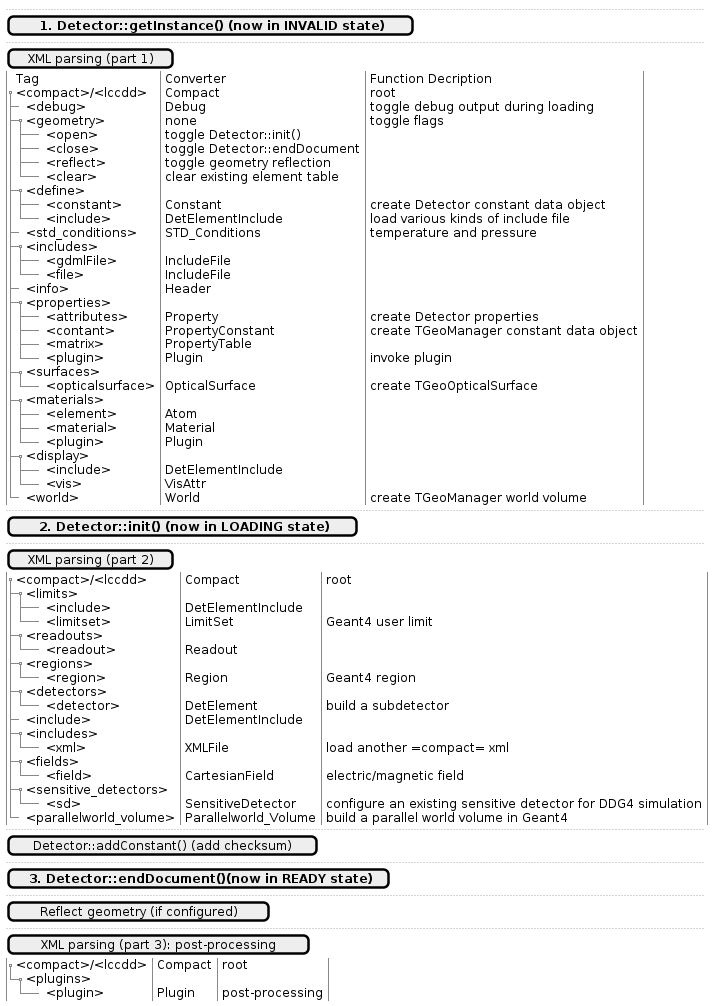
Correct invoking sequence of the converters is needed for tags which may use existing info from previous tags, e.g.
<detector> and <sensitivedetector>.
There’re three three states in Detector instance while building it from xml:
INVALID
LOADING
Detector::init()create theDetElementworld volume
READY
Detector::endDocument()compute box and close TGeo geometry
patching names of anonymous shapes
build a sensitive detector type map (e.g. ‘tracker’, ‘calorimeter’, ‘compound’, ‘passive’ etc.)
now it’s ready for usage or post-processing with plugin
2.1.6 Detector definition
A detector system is usually decomposed into multiple subdetectors either in a logical term or a physical term.
The geometry building in DD4hep reflects this fact by defining each subdetector under a <detector>
tag of compact xml file on the top-level of the geometry tree hierarchy.
The <detector> tags are parsed sequentially to build the complete detector system.
To parse <detector> tag, the client needs to implement a detector-builder plugin by:
// 1. definite a creator function to parse and build the sub-branch
// the function needs a static scope to be global and constraint visibility, signature is
// - decription : detector geometry which contains this subdetector branch
// - e : xml element <detector> corresponding to this subdetector
// - sens : the SensitiveDetector attached to this subdetector ~DetElement~
static Ref_t create_element(Detector& description, xml_h e, SensitiveDetector sens) {
  // define the subdetector element
  DetElement subdet(name, id);

  // parse the tags under <detector> to build the geometry branch of this subdetector
  // ...

  // return the built subdetector element
  return subdet;
}

// 2. declare the plugin
// name of the plugin is the 'type' attribute of <detector> tag
DECLARE_DETELEMENT(MyDetectorName, create_element)
detector-builder plugin is fully in charge of the creation of its own geometry tree branch.
In other words, the internals of a subdetector is encapsulated and Detector object
can only access the lower-level geometry tree through the subdetector’s DetElement.
The creation of subdetector branch is completely localized in detector-builder plugin.
Placement of the subdetector is performed with respect to the mother volume, which can be picked from
its associated Detector instances in an agnostic way:
Volume mother = description.pickMotherVolume(sdet);
The default mother volume is the world volume. But the client can customize the mother-daughter relation by explicitly register it with:
void Detector::declareParent(const string& subdetector_name, const DetElement& parent)
This is needed, e.g. when nesting one subdetector into another (see plugin DD4hep_SubdetectorAssembly as an example).
Note that the registration should be done before the creation of the daughter subdetector.
2.1.7 TODO Build type
A flag indicating the type of geometry to be built ~/src/physics/key4hep/DD4hep/DDCore/include/DD4hep/BuildType.h Is the geometry for:
Simulation
Reconstruction
Display
Envelope
2.1.8 Plumbing utilities to build geometry primitives
DD4hep xml parsing facility is flexible.
There is no limitation of the client to create his own xml tags and patterns,
and then build the geometry from these lowest level of tag attributes.
But most of time, it may be more convenient to use predefined parsing utilities with predefined xml pattern
to define the geometry primitives.
2.1.8.1 <shape>
Two factory methods exist:
use xml component parser member function:
Component::createShape()use utility function:
dd4hep::xml::createShape(Detector& description, const std::string& shape_type, xml::Element element)
Both of them uses shape-builder plugin internally.
All supported solids can be created with a type string (AKA Factory Pattern).
shape-builder plugin is defined with a DECLARE_XML_SHAPE macro.
All regular shapes are defined in ShapePlugins.cpp.
Exact attributes depends on the shape to be defined, read ShapePlugins.cpp for details.
/home/yong/src/physics/key4hep/DD4hep/examples/ClientTests/compact contains a list of example xml files
of defining various solids.
Boolean shape is special in DD4hep that it can be defined in a nested way:
<!-- example of defining the parallelworld with nested boolean solid -->
<parallelworld_volume name="tracking_volume" anchor="/world" material="Air" connected="true" vis="VisibleBlue">
  <!-- define the solid with three-level of nesting -->
  <shape type="BooleanShape" operation="Subtraction">
    <shape type="BooleanShape" operation="Subtraction">
      <shape type="BooleanShape" operation="Subtraction"  >
        <shape type="Tube" rmin="0*cm" rmax="100*cm" dz="100*cm"/>
        <shape type="Cone" rmin2="0*cm" rmax2="60*cm" rmin1="0*cm" rmax1="30*cm" z="40*cm"/>
        <position x="0*cm" y="0*cm" z="65*cm"/>
      </shape>
      <shape type="Cone" rmin1="0*cm" rmax1="60*cm" rmin2="0*cm" rmax2="30*cm" z="40*cm"/>
      <position x="0" y="0" z="-65*cm"/>
    </shape>
    <shape type="Cone" rmin2="0*cm" rmax2="55*cm" rmin1="0*cm" rmax1="55*cm" z="30*cm"/>
    <position x="0" y="0" z="0*cm"/>
  </shape>

  <!-- the volume's placement in mother volume -->
  <position x="0*cm"   y="50*cm" z="0*cm"/>
  <rotation x="pi/2.0" y="0"     z="0"/>
</parallelworld_volume>
2.1.8.2 <volume>
For regular volumes, i.e. volumes from CSG solid or assembly volume:
utility function:
dd4hep::xml::Volume dd4hep::xml::createStdVolume(Detector& description, xml::Element element)or plugin:
DD4hep_StdVolume
For general (in other word, special) volumes:
utility function:
dd4hep::xml::createVolume(Detector& description, const std::string& type, xml::Element element)or plugin:
DD4hep_GenericVolume
Special volume-builder plugin is defined using DECLARE_XML_VOLUME macro.
Currently, the only supported special volume is CAD model with type string ‘CAD_Assembly’ and ‘CAD_MultiVolume’.
Note that no fixed tag is associated with the above functions. It is the client’s own responsibility to assign a tag for using these functions. Usually, ‘<volume>’ is a sensible option.
Alternatively, the helper class dd4hep::xml::tools::VolumeBuilder can also parse ‘<volume>’ tags.
VolumeBuilder provides more features than building volumes:
method |
descriptin |
|---|---|
load(element, tag) |
load volumes and shapes from each xml file with |
makeShape(element) |
create the shape specified with a |
buildShapes(element) |
create each shape for each |
getShape(name) |
get a named shape from the internal map |
register(name, shape) |
append a named shape to the internal map |
buildVolumes(element) |
create volume for each |
volume(name) |
get a volume from the internal map |
registerVolume(name, volume) |
append a volume to the internal map |
collectMaterials(element) |
register each material for all |
buildTransformations(element) |
create transformation for each |
placeDetector(vol, element) |
place vol (envelope) into subdetector’s mother volume, and set subdetector to this placement |
placeDaughters(de_parent, vol_parent, element) |
place each |
Note
placeDaughters()also support the creation ofDetElementfor each placement by specifying<elemen>tag in
<physvol> attribute
But it does not cache the daughter
DetElementcreated, thus no way to get a handle of them directlyNote
VolumeBuilderis not the owner of the internal shape maps and volume maps. It is a simple aggregation of geometry building utilities and
the internal maps acting as local caches. It’s the client’s responsibility to ensure all created entities are used in
the detector geometry tree so that their ownership is transferred to the Detector instance (see Sec. sec:objmodel_handle)
Note
VolumeBuilderdoes not supportaddPhysVolID, thus not suited for one-to-many relation betweenVolumeandPlacedVolumeNote
VolumeBuildersupport settingSensitiveDetectorfor aVolumeNote
VolumeBuilderdoes not support definingVolSurface
2.1.8.3 <envelope>
This is a special tag, normally used to create an envelope volume of a subdetector, either as an assembly or big box. The envelope is supposed to be the top-level volume of the subdetector and placed into the world volume in most cases.
Envelop can be created as regular volume as in the previous section.
Alternatively, a dedicated utility function
dd4hep::xml::createPlacedEnvelope(dd4hep::Detector& description, dd4hep::xml::Handle_t e, dd4hep::DetElement sdet)
can be used, with following xml pattern:
<detector>
  <envelope vis="ILD_ECALVis">
    <shape type="PolyhedraRegular" numsides="8"  rmin="TPC_outer_radius+Ecal_Tpc_gap" rmax="Ecal_outer_radius"
           dz="2.*TPC_Ecal_Hcal_barrel_halfZ"  material = "Air" />
    <rotation x="0*deg" y="0*deg" z="90*deg-180*deg/8"/>
    <position x="1*cm" y="0*cm" z="0*cm"/>
  </envelope>
</detector>
2.1.8.4 <transformation>
2.1.9 CAD model
Both CAD import and export are supported and built upon third-party assimp library (open asset importer).
Export is described in Sec. `sec:detector_persistence`_
Usage examples can be found under /home/yong/src/physics/key4hep/DD4hep/examples/DDCAD/compact.
2.1.9.1 CAD shape
CAD shape can be created and used with the same API as described in Sec. sec:shape
xml pattern:
<!-- in case multiple objects exist in the file, mesh/item indicates index of the object selected -->
<shape type="CAD_Shape" ref="${DD4hepExamplesINSTALL}/examples/DDCAD/models/BLEND/HUMAN.blend" mesh="1"/>
2.1.9.2 CAD volume
Creating volumes directly from CAD objects are also supported (including placement transform):
<XXX ref="file-name"  material="material-name">
  <material name="material-name"/>                        <!-- alternative: child or attr -->

  <!-- Envelope:  Use special envelop shape (default: assembly) -->
  <!-- The envelope tag must match the expected pattern of the utility -->
  <!-- dd4hep::xml::createStdVolume(Detector& desc, xml::Element e) -->
  <envelope name="volume-name" material="material-name">
    <shape name="shape-name" type="shape-type" args....>
    </shape>
  </envelope>

  <!-- Option 1:  No additional children. use default material  -->
  <!-- and place all children in the origin of the envelope -->

  <!-- option 2:  Volume with default material -->
  <volume name="vol-name"/>

  <!-- Option 3:  Volume with non-default material -->
  <volume name="vol-name" material="material-name"/>

  <!-- Option 4:  Volume with optional placement. No position = (0,0,0), No rotation = (0,0,0) -->
  <volume name="vol-name" material="material-name"/>
  <position x="0" y="0" z="5*cm"/>
  <rotation x="0" y="0" z="0.5*pi*rad"/>
</XXX>
2.1.10 General-purpose detector-builder plugin
Normally, the client needs to write his own detector-builder plugin dedicated for his detector.
However, there are some predefined ones which might be useful for quick prototype demonstration [3] .
plugin name |
feature |
example |
|---|---|---|
|
Check_Shape_Box_Reflect_DetElement.xml |
|
|
Check_Shape_Box_Reflect_DetElement.xml |
|
2.1.11 Class diagram

2.2 Checklist building geometry tree
Solidmust be attached to aVolumeVolumemust be placed except the world volumeDetElementmust have a mother detector elementDetElementmust attach aPlacedVolumeusingsetPlacement()PlacedVolumein the path to a sensitive node must have a physical volume id usingaddPhysVolID[todo: more explanation, see this line]
DetElementmust be attached to each physical node that need alignment or surface in a degenerate wayVolSurfacemust be associated to eachDetElementwhich need a surface representationDetElementof a subdetector and itsPlacedVolumemust have a “system” id, which comes from<detector>tag’s “id” attribute.
2.3 Post-processing
2.3.1 Overview
After loading and building the geometry from xml, post-processor plugin can be invoked to manipulate the geometry.
These plugins are embedded into the compact xml as following:
<plugins>
  <!-- argument attributes are passed to the plugin as string -->
  <plugin name="PluginName_1">
    <argument value="blah"/>
    <argument value="blah blah"/>
    <!-- ... -->
  </plugin>

  <plugin name="PluginName_2">
    <argument value="foo"/>
    <argument value="foo foo"/>
    <!-- ... -->
  </plugin>

  <!-- ... -->
</plugins>
Unlimited number of plugins may be attatched, and they are invoked in sequence. This is a very flexible mechanism, since plugins can be toggled in the xml file without changing the source code.
post-processor plugin is defined by following mechanism:
// Define the actual function (in global scope) invoked by the plugin
// The signature is as following:
// - description : the target detector descriptin to be processed
// - argc, argv  : the parameter list from xml parsing or command line
long create_demo_plugin(dd4hep::Detector& descriptin,int argc,char** argv) {
  // ...
}

// define a post-processor plugin
#define DECLARE_APPLY(Deom_Plugin_Name, create_demo_plugin)
post-processor plugin can be used in other circumstances, here is a summary:
as described above, embedded in
compactxml as a integral part of xml loading processthis the last step of xml parsing, after loading other
Detectorcomponentsimposed on the detector description just loaded
internally, the invocation is dispatched to
Detector::apply(const char* factory, int argc, char** argv)
as the core of an independent application, demos are:
`teveDisplay<~/src/physics/key4hep/DD4hep/UtilityApps/src/teve_display.cpp>`_ usingint main_default(const char* name, int argc, char** argv)`geoWebDisplay<~/src/physics/key4hep/DD4hep/UtilityApps/src/webdisplay.cpp>`_ and`geoDisplay<~/src/physics/key4hep/DD4hep/UtilityApps/src/display.cpp>`_ usingint main_plugins(const char* name, int argc, char** argv)`geoConverter<~/src/physics/key4hep/DD4hep/UtilityApps/src/converter.cpp>`_ usinglong run_plugin(dd4hep::Detector& description, const char* name, int argc, char** argv
as a command line argument of general plugin running environment:
`geoPluginRun<~/src/physics/key4hep/DD4hep/UtilityApps/src/plugin_runner.cpp>`_ usingint invoke_plugin_runner(const char* name, int argc,char** argv)
Both step 2 and 3 need the compact xml file as a command line argument.
The xml file should define the detector geometry to be processed by the plugin.
2.3.2 Useful post-processor plugins
plugin name |
feature |
|---|---|
|
create a |
2.4 DetElement
2.4.1 Overview
DetElement acts as a data concentrator of all data associated with a detector component, e.g.
the detector hierarchy by exposing its children
its placement within the overall experiment if it represents an entire subdetector or its placement with respect to its parent if the
DetElementrepresents a part of a subdetector.information about the
Readoutstructure if the object is instrumented and read-out. Otherwise this link is empty.information about the environmental conditions e.g. conditons. The access to conditions is exposed via the DetConditions interface. See dd4hep/DetConditions.h for further details.
alignment information.
object extensions, e.g. surface, detector data.
DetElement is associated with a physical node of the geometry tree hierarchy.
Individual physical node must be identified by their full path from mother
to daughter starting from the world node.
Thus, the relationship between the DetElement and the placements
is not defined by a single reference to the placement, but the full path
from the top of the detector geometry model to resolve existing
ambiguities due to the reuse of logical volume.
The tree of DetElement is a parallel structure to the physical geometrical tree.
This structure will probably not be as deep as the geometrical one since
there would not need to associate detector information at very fine-grain.
Like Geant4 and TGeo geometry tree model,
each DetElement only knows its parent and daughters.
The whole geometry tree is built by recursively chaining these one-level relations.
Unlike Geant4 and TGeo geometry tree model,
the tree of DetElement is fully degenerate and each detector element object will
be placed only once in the detector element tree.
In contrary, a TGeoNode is placed once in its mother volume, but the
mother volume may be multiple times, thus placed multiple times in the end.
Note that this is an IMPORTANT feature rather than design flaw.
Think about the alignment problem: each sensor may have its own placement delta with respect to the
designed position. The intrinsic structure of these alignment data is in essence a degenerate one.
The transformation matrix with respect to the mother volume can be shared among multiple placement
of the mother volume into the grand-mother volume for perfect geometry model; but they can’t be shared
for alignment deltas.
This requirement is implicitly ensured the fact that DetElement constructor establishes
the daughter-child relation and later changes will update the mother element accordingly.
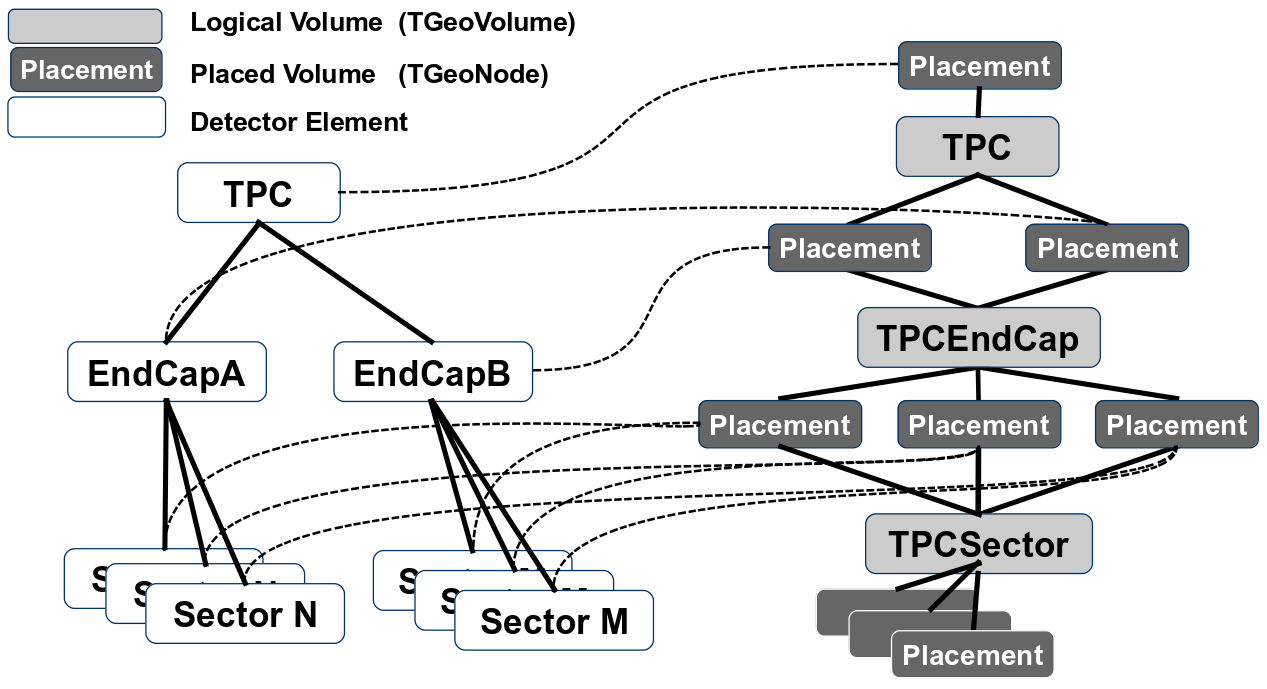
Association between physical and detector element tree (courtesy: DD4hep official doc) [todo: erase the placement under tpcsector]
2.4.2 Useful properties
property |
type |
usage |
|---|---|---|
id |
int |
should be unique for subdetector element, otherwise not very useful [todo: confirm it] |
name |
string |
part of path string in the detector element tree hierarchy, should be unique in the same level |
level |
int |
level in the detector element tree hierarchy, start from 0 (the world), -1 for invalid |
path |
string |
path string from world to this element in the detector element tree, empty if envalid |
placementPath |
string |
path string from world to this element’s placement in the physical geometry tree (i.e. no hole), empty if invalid |
key |
unsigned int |
a unique hash id generated from the path |
type |
string |
detector raw category: ‘tracker’ ‘calorimeter’ |
typeFlag |
unsigned int |
mask to indicate fine category: |
volumeID |
long long int |
only valid for sensitive element, assembled when instantiating |
privateWorld |
[todo] |
|
parent |
DetElement |
as the name suggests |
children |
map<string, DetElement> |
as the name suggests |
updateCalls |
[todo] |
|
combinHits |
bool |
whether combine hits in this volume, may be used in simulation |
2.4.3 Category of detector
DetElement representing a subdetector is categorized into 4 pre-defined types:
tracker
calorimeter
compound
passive
In addition, they can further be grouped by a type flag mask: [todo]
2.5 Volume-related Data
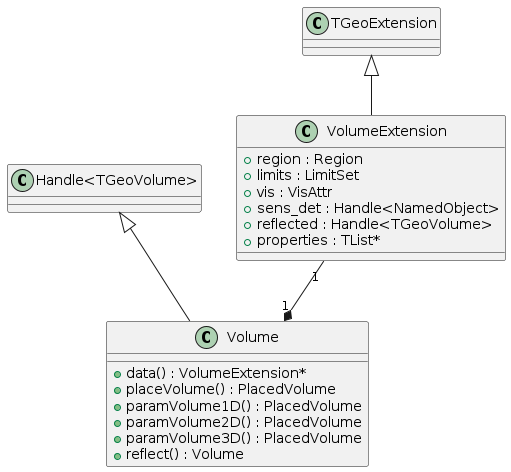
The DD4hep geometry tree is built from Volume and PlacedVolume, which are basically TGeoVolume and TGeoNode
in essence.
Technically, Volume is a subclass of Handle<TGeoVolume> and PlacedVolume of Handle<TGeoNode>
(see Sec sec:object_model for explanation of Handle).
Both PlacedVolume and Volume have defined a TGeoExtension extension class and attatched to each instance.
These extension data can be saved on disk along with the geometry hierarchy [todo: confirm it]
2.5.1 Volume Extension
2.5.2 PlacedVolume Extension
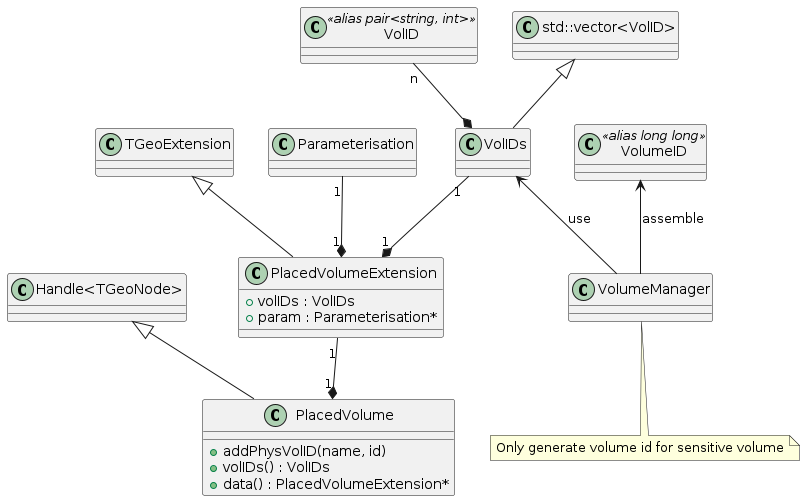
Each DetElement associated with a sensitive geometry node has a unique VolumeID.
2.5.3 VolumeID and VolumeManager
A special member of PlacedVolumeExtension is VolIDs, which is a collection of (name, id) pairs.
Normally, each pair represents a unique id of this placement at the geometry tree level
represented by the pair’s name string.
It’s the user’s responsibility to assign an appropriate (name, id) for each placed volume.
In the end, the collection of all (name, id) pairs from each PlacedVolume in the path to a sensitive PlacedVolume is:
scanned by the sensitive detector’s
IDDescriptor
2 each field of IDDescriptor should match one VolID by matching name
idof the matchedVolIDis extracted and assembled into the placed sensitive volume’sVolumeIDusingBitFieldCoder
The final VolumeID is the one assigned to this specific sensitive PlacedVolume.
This is process is performed by a VolumeManager instance after the geometry is built and closed,
by applying the post-processor plugin DD4hep_VolumeManager or DD4hepVolumeManager:
either embed it in
compactxmlor invoke static method
VolumeManager::getVolumeManager(desc)
Otherwise, VolumeID is not assembled and not valid.
This VolumeManager is owned by the associated Detector instance.
Some API classes implicitly perform this step during its instantiation:
SurfaceManagerCellIDPositionConverter
so clients do not need to worry about this issue using these classes.
In addition of generating volume id, VolumeManager is also used to fetch geometry info based on VolumeID:
/// Lookup the context, which belongs to a registered physical volume.
VolumeManagerContext* lookupContext(VolumeID volume_id) const;
/// Lookup a physical (placed) volume identified by its 64 bit hit ID
PlacedVolume lookupVolumePlacement(VolumeID volume_id) const;
/// Lookup a physical (placed) volume of the detector element containing a volume identified by its 64 bit hit ID
PlacedVolume lookupDetElementPlacement(VolumeID volume_id) const;
/// Convenience routine: Lookup a top level subdetector detector element according to a contained 64 bit hit ID
DetElement lookupDetector(VolumeID volume_id) const;
/// Convenience routine: Lookup the closest subdetector detector element in the hierarchy according to a contained 64 bit hit ID
DetElement lookupDetElement(VolumeID volume_id) const;
/// Convenience routine: Access the transformation of a physical volume to the world coordinate system
const TGeoMatrix& worldTransformation(const ConditionsMap& map,
                                      VolumeID volume_id) const;
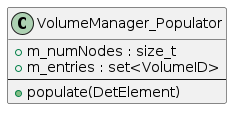
2.5.3.1 VolumeManagerContext
It’s often used to access the PlacedVolume of the sensitive component or of the closest DetElement:
// first get the context from VolumeManager by cellID
auto volCxt = volManager.findContext(cellID);

// Acces the sensitive volume placement
PlacedVolume pv1 = volCxt.volumePlacement();
// Acces the closest detector element volume placement
PlacedVolume pv2 = volCxt.elementPlacement();
2.6 TODO SensitiveDetector
2.6.1 overview
A SensitiveDetector is created and associated with the subdetector element during compact xml loading.
By default, an empty SensitiveDetector is instantiated.
Valid SensitiveDetector is activated when defining a Readout for the subdetector element.
The sensitive Volume also needs to explicitly claim it by invoking:
// in detector-builder plugin
sens_volume.setSensitiveDetector(sd);
Otherwise, the volume’s sensitivity can’t be deduced during simulation.
Type of the sensitive subdetector is also import, which is related to the default Geant4Action used to process
the hit step during simulation. [todo: explain it in DDG4].
combineHits |
wether combine hits in the same cell |
ecut |
|
readout |
|
region |
|
limits |
|
hitsCollection |
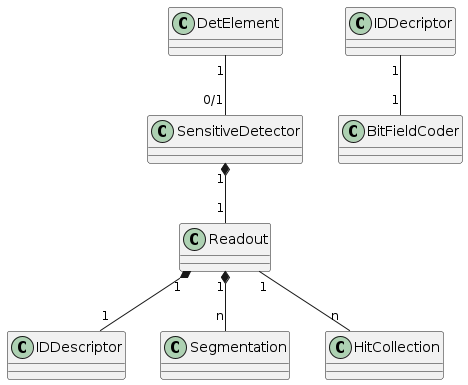
2.6.2 Readout & Segmentation
Most aspects are well explained in the official user guide.
Segmentation will compose a CellID based on sensitive volume’s VolumeID and the segmentation specification.
One missing point is the MultiSegmentatiom and NoSegmentation support and how to use them [todo].
2.6.3 IDDescriptor & BitFieldCoder
They are clearly explaned in the official user guide.
Add how to use [todo]
2.7 TODO Field
OverlayedField
2.8 Material
Well-explained in official user guide.
2.9 Persistence
Import from
compactxmlImport from GDML
plugin:
DD4hepGeometry2GDMLDD4hep_ROOTGDMLExtractDD4hep_ROOTGDMLParse
Import
TGeoManagerfrom ROOT fileplugin:
DD4hep_PlainROOTfile: ~/src/physics/key4hep/DD4hep/DDCore/src/gdml/ImportPlainRoot.cpp
-
Plugin:
DD4hep_Geometry2ROOTandDD4hep_RootLoaderThe save object is
DD4hepRootPersistency, because:Segmentationcan’t be saved directlyto save alignment conditions
Save
DetectorImpdirectlyoverriding
TNamed::Write()not available in
Detectorinterface
Save to GDML
Save to CAD model (with post-processor plugin
DD4hep_CAD_export)
Note Geometry model import from gdml and TGeoManager need verification that full features as compact xml
2.10 Visualization
2.10.1 Native method
DetectorImp owns a TGeoManager, which can be draw by `DetectorImp::dump <~/src/physics/key4hep/DD4hep/DDCore/src/DetectorImp.cpp>`_
// ROOT macro
gSystem->Load("libDDCore.so");
auto& detdesc=dd4hep::Detector::getInstance()
detdesc.fromXML("YourDetector.xml")
detdesc.dump()
2.10.2 Utility apps
geoWebDisplay
geoDisplay
teveDisplay
ddev
2.11 Apps
executable |
features |
|
print out: xml header, detector type, detector data, sensitive detector, surfaces |
2.12 TODO Other Data Structures
2.12.1 Condition data
OpaqueData
2.12.2 Alignment data
3 TODO DDG4
3.1 Kernel Access
Master Kernel is a singleton:
// master kernel constructor in public:
Geant4Kernel(Detector& description)
// singleton access, global scope
static Geant4Kernel& instance(Detector& description);
// from worker's scope
Geant4Kernel& master()  const  { return *m_master; }
The master constructor is in public scope, but only instance() method is used as access interface.
Maybe, it’s a good idea to put master constructor in protected scope.
Worker constructor in in protected scope, not directly accessible to clients.
Instead, kernel can only be created & accessed through the master kernel:
// worker constructor is protected. m is master, identifier should be thread id
Geant4Kernel(Geant4Kernel* m, unsigned long identifier);
// create, use thread id by default
virtual Geant4Kernel& createWorker();
// access , flag is to control creation if not exist
Geant4Kernel& worker(unsigned long thread_identifier, bool create_if=false);
// identifier is system thread id
static unsigned long int thread_self();
// usage example
Geant4Kernel&  krnl = kernel().worker(Geant4Kernel::thread_self(),true);
Example application:
Customized Python interpreter
pyddg4.cpp : the executable
PyDDG4.cpp : the kernel usage
Python binding:
DDG4.Kernel is KernelHandle defined in Geant4Handle.h
Each KernelHandle instance points to the master kernel
standalone exectutable demo: g4FromXML.cpp
3.2 Multi-Threading
DDG4’s threading context is built upon Geant4’s MT running environment.
Controlled by:
NumberOfThreads property (in python script)
Demo application:
/home/yong/src/physics/key4hep/DD4hep/DDG4/examples/SiDSim_MT.py
4 TODO DDDigi
5 DDRec
5.1 CellIDPositionConverter
This class is designed to be the main API to the geometry info for reconstruction tasks.
It is instantiated with current Detector instance.
Most of its methods accepts CellID or global 3d-position, which are directly available from recorded hit.
5.2 Surface
Most surface related features are located in DDRec package, but they are closely related to the core geometry
building process implemented in DDCore.
5.2.1 Overview
‘Surface’ in DD4hep normally is associated with a measurement surface of a detector element, but can be used
for any purposes (e.g. passive material like beam pipe).
Surface is attached/associated with a geometry volume.
Interface class ISurface provides the access interface of using surface for the client:
Method |
Decription |
|---|---|
type() |
properties of the surface |
id() |
same as DetElement id or volID or cellID |
u(), v() |
the two unit vector along the two measurement direction on the surface |
origin() |
origin unit vector of the surface measurement coordinate system |
normal() |
unit vector along the normal direction of the surface, usually point out of the sensitive area |
length_along_u()/v() |
the length of the surface along u or v, can be used for boundary checking of regular shape |
insideBounds() |
default condition: on surface with a tolerance and inside shape, customizable |
distance() |
distance to the surface, used to judge on surface or not,default is perpenticular line, customizable |
globalToLocal() |
3d global coordinates to 2d (u,v) coordinates with o as origin |
localToGlobal() |
reverse of globalToLocal() |
getLines() |
for drawing the surface (used in teveDisplay to show the attached surface) |
inner/outerThickness() |
thickness along normal and minus-normal direction of the surface |
inner/outerMaterial() |
material type on the inside/outside of the surface |
5.2.2 Data classes
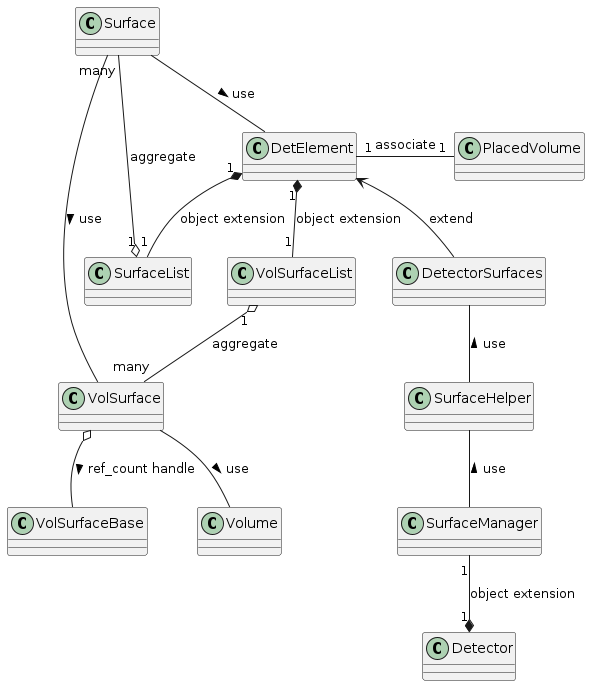
The implementation distinguishes the concept of logical surface and physical surface by two subclass from ISurface:
VolSurfacea logical entity, which provides
the association with a logical volume
u,/v/,/n/,/o/ vectors in the associated volume’s coordinate system
fake (just in the local coordinate system) transform: localToGobal and globalToLocal
in bottom, it acts a shared_ptr style resource handle to
VolSurfaceBasewhichVolSurfaceBaseis the real data object underneath
some setters in addition to
ISurfaceinterfacescustom implementation may be provided for special volumes by inheriting from
VolSurfaceusing local coordinates as argument
this is the interface client uses to define a surface in detector construction
Surfacerepresents a placed surface, which provides
the association with a
DetElement(since detector element is fully degenerated tree)use world transformation of
DetElementto define the real position of the physical surfaceu, v, n, o vectors in the world coordinate system
real coordinate system transform: localToGlobal and globalToLocal
custom implementation may be provided for special surfaces by inheriting from
VolSurfaceit’s a usage class without setter
using global coordinates as argument
this is the interface client uses for reconstruction purposes
Two list of the above two types of ISurface implementation:
VolSurfaceListcontained
VolSurfaceis reference counted
SurfaceListowner of the contained
Surface
Both inherit from std::list of surface pointers for efficient insert/splice.
Both are attach to the DetElement as a data object extension (for object extension, see Sec. sec:extension).
List of predefined surface shapes:
shape |
|
|
description |
|---|---|---|---|
Plane |
|
|
flat plane, moest common type |
Cone |
|
|
|
Cylinder |
|
|
no z constraint |
Cylinder |
|
|
add z length constraint |
List of pre-defined implementation of VolSurface, they are defined mainly to
hide the dynamic allocation of the underlying VolSurfaceBase object (AKA value semantic):
VolSurfaceHandle<T>type argument is of type
VolSurfaceBaseVolPlaneas a demo:typedef VolSurfaceHandle< VolPlaneImpl > VolPlanelimitation: the constructor signature is limited
VolConefor Cone style surface with special constructor arguments
VolCylinderfor Cylinder style surface with special constructor arguments
SimpleCylindera customized cylider surface implementation defined for beam pipe
defined in
DDDetectors
List of pre-defined physical surface class:
SurfaceCylinderSurfaceConeSurface
5.2.3 Management classes
There are three levels of management (as a class) defined:
DetectorSurfacessubclass of
DetElementcreate the
SurfaceListobject extensioncreate a list of
Surfacefrom theDetElement’sVolSurfaceListand put them into theSurfaceListextensionthis
SurfaceListis the owner of the containedSurfaceacts on the same level of geometry tree, no transversal into daughter level
SurfaceHelperusually acts on a top-level subdetector element (no constraint on using it in any level of geometry tree)
scan through current and all lower levels of the geometry tree
uses
DetectorSurfacesinternally to createSurfaceListfor eachDetElementon the lower levelcollect all
Surfacein this process and stores a copy of them in aSurfaceListdata memberthis
SurfaceListis not the owner of containedSurface, just a view
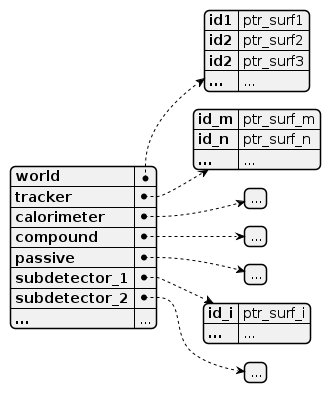
SurfaceManageracts on the detector descriptin level (aka world-level)
loop through all top-level subdetectors
in this processs
uses
SurfaceHelperto create surfaces for each subdetectorand collect a copy of all surfaces and categorize them according to subdetector name, detector type name and ‘world’
the entry in each category is a
std::multimapwith surface id as key and pointer toSurfaceas value
these surface maps are not owner of contained
Surface, just a viewit is created with
InstallSurfaceManagerplugin, usually embed in thecompactxml as a post-processor [4] .SurfaceManageris installed as a data extension ofDetector
5.2.4 Add surface
Adding surface into detector geometry is simple:
create
VolSurfaceadd it to a
DetElementinstantiate a
SurfaceManager
Method 1: in the detector construction plugin source:
DetElement aDE( motherDE, names, id);
aDE.setPlacement(pv) ;
// define the DetElement and a VolSurface yon need, here is flat plane
VolPlane surf(...)
// use helper function to add it to the associated DetElement's VolSurfaceList
volSurfaceList(aDE)->push_back(surf) ;
Then, in the compact xml, add a post-processor plugin:
<plugins>
   <plugin name="InstallSurfaceManager"/>
</plugins>
IntallSurfaceManager is needed to create a SurfaceManager instance, which in turn scan through the geometry
tree and create the surfaces and put them into corresponding maps in the meantime.
Method 2:
alternatively, DD4hep provides an API to define a post-processor plugin to add VolSurface after the geometry
tree is closed. The API is defined in SurfaceInstaller.cpp source file in DDCore package and aims to add
surfaces to a top-level sub-detector automatically.
Since it’s a plugin, user can choose to add VolSurface into the geometry or not by toggling the plugin.
An demo usage is as following, in the plugin source file:
// 1. an optional data struct to hold xml parameters of this plugin
namespace {
  struct UserData {
    int dimension ; // measurement dimension, 1 or 2
    double uvector[3]; // one of the measurement direction unit
    double vvector[3]; // the other one
  };
}

// 2. the API requested macros
#define SURFACEINSTALLER_DATA UserData
#define DD4HEP_USE_SURFACEINSTALL_HELPER DD4hep_GenericSurfaceInstallerPlugin // name of the plugin

// 3. include the API header
#include "DD4hep/SurfaceInstaller.h"

// 4. optionally overwrite the function to handl xml parameters, to be stored in UserData
template <> void Installer<UserData>::handle_arguments(int argc, char** argv)   {
  // parse argc and argv directly, they are correctly fetched from xml by the API
  // ...
}

// 5. optionally overwrite the function to create VolSurface.
//    It's invoked for every ~DetElement~ in the subdetector's geometry sub-branch
template <typename UserData>
void Installer<UserData>::install(dd4hep::DetElement component, dd4hep::PlacedVolume pv)   {
  // component: a detector element; pv: the placeVolume of this detector element

  // ...

  // define the VolSurface as usual
  VolPlane surf(comp_vol, type, inner_thickness, outer_thickness, u, v, n, o);

  // attach the VolSurface (Caveat: not with volSurfaceList())
  addSurface(component,surf);

  // optional stop scanning the hierarchy any further, only process the top-level element
  stopScanning() ;
}
Then, add this plugin in the compact xml:
<!-- name is existing subdetector name -->
<plugins>
  <plugin name="DD4hep_GenericSurfaceInstallerPlugin">
    <!-- argument is pased to handle_arguments() -->
    <argument value="OuterTrackerBarrel"/>
    <argument value="dimension=2"/>
    <argument value="u_x=1."/>
    <argument value="v_y=1."/>
    <argument value="n_z=1."/>
  </plugin>

  <!-- still needed to actually create Surfaces -->
  <plugin name="InstallSurfaceManager"/>
</plugins>
Usually, SurfaceInstaller is customized to install surfaces for sensitive detector elements automatically.
Predefined installers defined in DDDetectors are:
plugin name |
feature |
|---|---|
|
create plane surface for sensitive box shape, u,v,n,o configuration |
|
same as above, but more constraint u,v,n,o |
|
trapezoid sensitive shape |
|
polyhedra sensitive shape |
|
barrel box shape, not sensitive-related, a single plane for each slice |
|
two mono-block polyhedron for each endcap, not sensitive-related |
5.2.5 Use surface
Method 1:
cellID-based using SurfaceManager interface
// SurfaceManager instance is an extension object of dectector descriptin
Detector& description = context()->detectorDescription();
SurfaceManager& surfMan = *description.extension< SurfaceManager >() ;

// Get the category of surface map
const SurfaceMap& surfMap = *surfMan.map( "world" ) ;

// cellID is from hit, use it to find the surface
SurfaceMap::const_iterator si = surfMap.find(hit->cellID);
ISurface* surf = (si != surfMap.end() ?  si->second  : 0);

// use any method you need
double dist = surf->distance(hit_point)/dd4hep::mm;
auto isInside=surf->insideBounds(hit_point)
Method 2:
DetElement-based
// method one:
// use a target detector element to create the helper
SurfaceHelper surfMan(det) ;
// fetch and loop through the surface list
const SurfaceList& sL = surfMan.surfaceList() ;
for( SurfaceList::const_iterator it = sL.begin() ; it != sL.end() ; ++it ){
  // ...
 }

// method two:
// just fetch the surface list directly from detector element
SurfaceList* sL = det.extension<SurfaceList>();
5.2.6 Class diagram
6 TODO DDAlign
6.1 Alignment procedure
ideal geometry: from design, the start point
actual geometry (called global aligenment in dd4hep): after installation, from survey
realignment (called local alignment in dd4hep): caused by environment or aging, small deltas, from calibration/data analysis
Alignment parameters may be applied to any volume of the ideal geometry. The alignment only affects the actual position of a volume it is e.g. irrelevant if the volume is sensitive or not.
(re-)align a volume in the hierarchy means to logically lift a full branch of placements from the top volume down to the element to be (re-)aligned out of this shared hierarchy and apply a correction matrix to the last node.
In general any deviation from the ideal position of a volume can be described by \(T = L * P * R * P^{-1}\), where
\(T\) is the full transformation in 3D space containing the change to the
exiting placement transformation. The existing placement is the placement transformation of the volume with respect to the mother volume.
\(L\) is a translation specifying the position change with respect to the mother volume.
\(R\) is a rotation specifying the position change with respect to the mother volume
\(P * R * P^{-1}\) describes a rotation around a pivot point specified int he mother volume’s coordinate system.
\(P\) is the translation vector from the mother volumes origin to the pivot point. The concept of a pivot point does not introduce a new set of parameters. Pivot points only help to increase the numerical precision.
Most of the changes do not require the full set of parameters. Very often the changes only require the application of only a translation, only a rotation or both with a pivot point in the origin.
7 TODO DDCond
8 Utilities
8.1 Versioning
std::string dd4hep::versionString();
9 Kernel of the core
9.1 Object Model of DDCore
Object in DD4hep is an concept denoting a class of pure data.
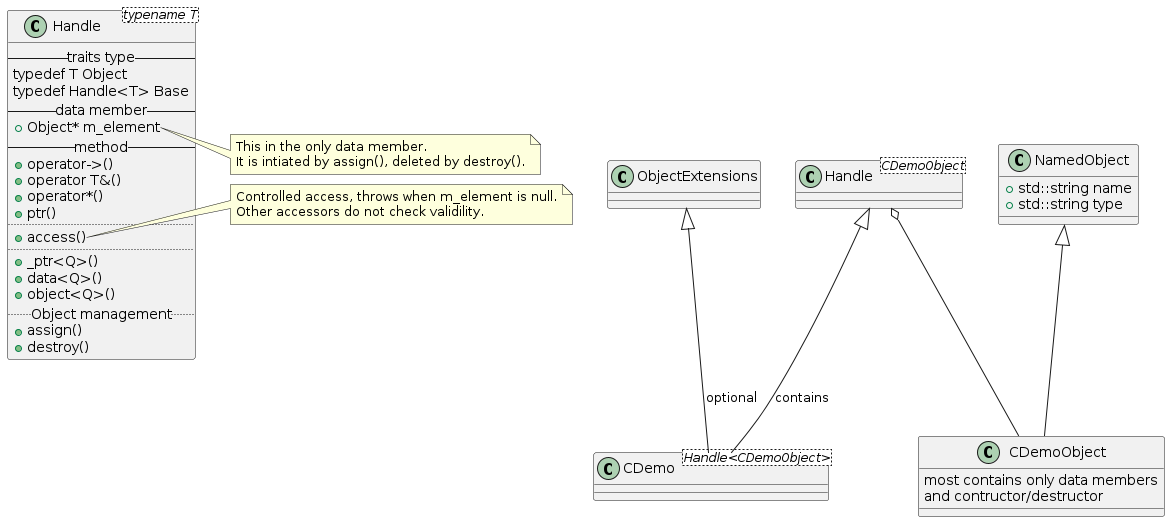
The literal ‘Object’ is sometimes used as template argument name.
It’s a logical concept without corresponding class definition, just like a C++20 Concept.
NamedObject is a concrete class, providing named and titled implementation for inheriting Object.
Handle<NamedObject> is a template class acting as the base class to access all named Object in DD4hep.
It acts as a shared pointer of underlying NamedObject.
No reference counting [5] is added, explicit destroy needed and the ownership is statically defined by the designer.
Object in DD4hep is always passed and handled by a Handle.
Handle<NamedObject> is aliased to Ref_t.
All Handle managed resources are created on heap, thus having static life span.
By subclassing Handle<NamedObject>, different intefaces may be designed to manipulate underlying data and expoesd
to different clients. This leads to very flexible implementation.
This is a more general feature, not a cons, as seen by the author.
9.1.1 Using Handle
Typical usage (Objects.h file provides some simple demos):
Define a data class (e.g. named
CDemoObject) containing real resources as a subclass ofNamedObject‘Object’ suffix reflects the fact that the class is a data object
they are almost pure aggregation of underlying resources
these data classes are considered internal details, thus usually defined in ‘XXXIntern.h’ (e.g. ‘CDemoInterna.h’)
Define a concrete class inheriting from the object class (e.g.
CDemo : public Handle<CDemoObject>)the concrete class acts as the interface to the object class
it defines real manipulation of underlying resources
Ownership management:
create and assign the object class is flexible:
Most use
newoperator and then assign in interface handle class’s constructorSome use
newexplicitly in normal code and assign, e.g.Fieldcreation inCompact2Objects.cppSegmentationusePluginService::Create<SegmentationObject*>(seg_type, dec)in constructorsince various segmentation implementation available, a factory pattern is needed
destroy (a.k.a. the ownership)
member function:
destroy(no use in codebase)Most owner uses global function:
destroyHandle()anddestroyHandles()
Ownership is declared if the owner is in charge of destroying the handle.
It’s static and hard-coded.
Most object ownership is solved in DetectorData:
DetectorDatain the owner of mostHandledirectly, i.e. destroy them in destructorDetElementownership is special in thatDetectorDataowns a worldDetElement, this world in turn owns all its childrenVolumein the same sense thatDetectorDataowns a topVolumeManager, which in turn owns all its child Volume. [todo: this is guess, to be verified]
9.2 TODO Plugin Framework
9.2.1 Rationale
plugin is nothing more that some files in a right format (DLLs that implements the API your Software defined), put in the right folders (directories your Software looks for plugins).
other names: module, component, extension etc.
component oriented programming(from dd4hep Handle.h comment)
9.2.2 Overview
The design of Plugin Mechanism is based the idea of Factory Pattern.
The implementation is special in regard of auto-loading the plugin library.
The architecture is identical with Gaudi (core is copied from Gaudi codebase,
check directory GaudiPluginService/Gaudi).
But more wrappings (as pre-defined macros) are added around the core for easy use and modular organization.
All of pre-defined macros to create a new plugin component is listed in package/Factories.h.
Some macros frequently used are [todo]:
9.2.3 Internals
9.2.3.1 main classes

9.2.3.2 thread-safety implementation
Two mutex are used in Registry:
A global one to synchronize singleton creation and access
A member one in
Registryto synchronize factory entry info registration and access
9.3 Extension Mechanism
9.3.1 Overview
Any data class instance can be attachech to
ObjectExtensionsdeduced class objects (either by inheritance or composing)ObjectExtensionsacts as a store by containing a map of extension entries ofExtensionEntryEach
ObjectExtensionsinstance has its own private storeUse pointer to
ExtensionEntryas entry valueIn most cases, it owns the extensions (i.e. in charge of delete)
Use type info to generate a key, thus easily using template to generate new entry
no two entry with same type is allowed in the same
ObjectExtensionsobjectthe interface class type should be used as key generator
ExtensionEntryis an interface, which acts as a handle to manage the underlying data objectimplemented as a template of the underlying data object type as argument
multiple implementations exist with different ownership policy:
SimpleExtension: no ownership transfer to containingObjectExtensionsDeleteExtension: with ownership transferCopyDeleteExtension: with ownership transfer and copy() as cloneDetElementExtension: same asCopyDeletExtension, but inDetElementscope only
Class need extension support may either inherit from or contains ObjectExtensions.
class |
package |
inheritance |
ownership transfer |
|---|---|---|---|
DetectorData |
DDCore |
data member |
yes |
SnsitiveDetector |
DDCore |
inheritance |
yes |
DetElement |
DDCore |
inheritance |
yes |
DigiEvent |
DDDigi |
inheritance |
optional |
Geant4Run |
DDG4 |
inheritance |
optional |
Geant4Event |
DDG4 |
inheritance |
optional |
9.3.2 How to use
<typename IFACE, typename CONCRETE> IFACE* addExtension(CONCRETE* c)demo:
MyClassABC* dex=addExtension<MyClassABC>(ptr_MyClass)
template <typename IFACE> IFACE* extension()demo:
MyClassABC* dex = extension<MyClassABC*>()
Both return values are pointer to the interface class.
9.3.3 List of useful extension data class
The data extension is totally application-specific.
But there are some general purpose predefined in DD4hep, which are useful for library developers:
class |
plugin |
feature |
|
|
used to attach unlimited number of primitives parameters to a specified |
9.3.4 Class diagram

9.4 TODO Callback mechanism
used in:
DetElement
DDG4
DDEve