- Author:
yong
1 A Quick Tour
1.1 Overview
k4megat follows the latest HENP software development trend.
Key components (aka Key4hep software stack) are:
- Event processing framework
- Event data format
-
- Interface to Gaudi’s event data store
- Detector geometry management
- Simulation interface (adapated to Gaudi’s algorithm pattern)
migrated from k4SimGeant4
1.2 Write and run a job
Jobs are steered by a python script called job option file in Gaudi’s jargon.
Users need to write their own job option to customize the job process chain.
The job option file contains:
importthe services, tools and algorithms neededconfigure each imported objects by setting their properties
append them to the
AppMgrinstance
To run the job:
k4run <JOB_FILE>
1.3 Write a new algorithm
Writing a Gaudi algorithm for a specific task is the most common development. The development can be grouped as follows:
- Property specification
parameters passed in in job option files to control the behavior of the algorithm
- Event data access
event data input/output, or interfacing with event data store
- Service access
e.g. detector geometry, random number etc.
- Processing
the real computing work of the algorithm, which are formalized as three callback functions:
initialize(), execute(), finalize()- Component declaration
create the algorithm as a Gaudi plugin component, so that it can be loaded automatically.
1.3.1 Configuration (Gaudi::Property)
Define the property in the algorithm’s class definition:
// in header: declare a property data member
// arguments: {this, NAME, DEFAULT_VALUE, COMMENT}
Gaudi::Property<double> m_sigmaE{ this, "energy_sigma", 50,
                                  "[eV] Sigma of the energy distribution of a single channel" };
Gaudi::Property<double> m_sigmaT{ this, "time_sigma", 100,
                                  "[ps] Sigma of the time distribution of a single channel" };
The property values are specified in job option file as follows:
from Configurables import TpcSimpleSmearAlg
tpcpixelsmeared = TpcSimpleSmearAlg("TpcPixelSmear")
tpcpixelsmeared.energy_sigma = 10 # eV
tpcpixelsmeared.time_sigma = 100 # ps
1.3.2 Event Data access
Gaudi::DataHandle
1.3.2.1 input
1.3.2.2 Output
1.3.3 Service access
Gaudi::ServiceHandle
1.3.4 Processing
initialize()
execute()
finalize()
1.3.5 Component declaration
To be
1.4 Tutorial
The mgtut repository contains examples of demo algorithms and the associated job options showing how to use and how to develop Gaudi algorithms.
The repository is also a standalone Gaudi project, which acts as a template for the development of your own algorithms.
2 Event Data Model
EDM4hep is the underlying event data model, which is defined and generated using podio library which implements an event data
description language, defines template sources for in-memory representation, defines an I/O interface for persistence,
and an example implementation for ROOT file persistence.
It aims to be the standard data model in HENP community.
In this way, not only the development of components in the same experiment software can be decoupled, but also common processing packages can be
developed and shared in the community such as Acts Common Tracking Software.
All next-generation collider experiments have adopted EDM4hep for their pilot simulation studies.
A good summary of podio/EDM4hep features can be found int EIC Software Infrastructure Review: Data Model.
.. image:: fig/podio_edm4hep_summary.png
2.1 What is saved in ROOT file
EDM4hep classes (more precisely, collections) are serialized to ROOT file into FLAT structure by PodioDataSvc (from k4FWCore).
When they are read back, the PodioDataSvc will assemble these flat pieces back as a usable EDM4hep class.
In most cases, users do not need to care about the persistence format when designing algorithms based on Gaudi, since
Gaudi::DataHandle hides these details and gives users an uniform interface.
However, knowing these flat pieces may be helpful if using third-party tools (especially tools from Python ecosystem) for quick analysis.
Besides, there are other metadata objects saved alongside the collection components, which give valuable information from
data management point of view.
#+name tbl:root_format
tree name |
branch |
type |
description |
entry number |
|---|---|---|---|---|
events |
coll_name (specified by user, e.g. |
|
POD part of event data model class (here it’s |
event-based |
reference member of coll_name (e.g. |
|
references to other edm41ep collections |
||
vector member of coll_name (e.g. |
|
vector member of arbitrary type |
||
metadata |
|
|
mapping between |
single entry |
|
|
PODIO version used |
||
|
|
info of saved collections: collid, type, isSubsetColl |
||
|
|
Gaudi job option generating this ROOT file |
||
|
|
version of key4stack used if plausible, otherwise empty |
||
evt_metadata |
|
|
event metadata |
event-based |
col_metadata |
|
|
metadata about edm4hep collections |
single entry, indexed by collection id |
run_metadata |
|
|
run metadata |
single entry, indexed by run id |
NOTE:
the data objects stored are based on current implementation of k4FWCore, which in turn built on top of PODIO::EventStore.
There is a plan to replace EventStore by podio developers in the near future, thus forcing k4FWCore to be upgraded.
So, the current format may change when this upgrade happens.
Example scripts are provided for inspecting metadata trees.
2.2 TODO Future development
Current
k4FWCoreis limited, no MT support.Multi-threaded Event Data Service
To be updated to Gaudi::Functional
Extension of EDM4hep
TPC may need special data model not provided by edm4hep
Possible to define new data class reusing edm4hep classes
Proposed by EIC community and EDM4eic is a nice reference, see this slide

3 Geometry model
Geometry model description is based on DD4hep compact XML syntax.
Knowledge of DD4hep is not needed for end user, recommend for average developer, a must read for software builder/maintainer.
A parameterized geometry model (yet simplified) is available, consisting of:
CZT calorimetor
TPC
Vessel

3.1 Time Projection Chamber (TPC)
3.2 CZT Calorimeter (Calo)
4 System of Units
Packages like Geant4, ROOT/TGeo, DD4hep use different system of units.
Special attention is needed for units conversion, which may cause confusion if not a bug in later analysis.
unit |
Geant4 |
DD4hep |
EDM4hep |
ROOT/TGeo |
CLHEP |
|---|---|---|---|---|---|
Length |
mm |
cm |
mm |
cm |
mm |
Energy |
MeV |
GeV |
GeV |
GeV |
MeV |
Time |
ns |
s |
ns |
s |
ns |
Angle |
radian |
radian |
radian |
degree |
radian |
Note:
DD4hep default units are same as ROOT, see definition in DD4hep/DDParsers/include/Evaluator/DD4hepUnits.h.
Units in DD4hep can be changed to be same as Geant4 when build with DD4HEP_USE_GEANT4_UNITS=ON.
DD4hep also provides a patch of TGeo to use Geant4 units as well.
This build option is also passed to sub-projects using DD4hepConfig.cmake (see ReleaseNote DD4hep/doc/ReleaseNotes.md:1110).
By default, this option is off (as well as in key4hep Spack bundle).
Meagat software currently follows EDM4hep convention, i.e. using (GeV, mm, ns, radian) as default units.
Note: internally, CLHEP units are used to represent all units and calculate conversion factors between different systems of units
(see k4megat/sim/kernel/include/SimKernel/Units.h for a list of common conversion factors).
Best practice: always specifying the unit when first getting a raw value outside of EDM4hep.
For example, when initializing a numerical Gaudi::Property:
// in class declaration header
Gaudi::Property<float> m_wValue{ this, "wvalue", 25, "[eV] Mean activation energy during primary ionization" };

// in initialize()
// here, using CLHEP directly for the fine units
m_wValue        = m_wValue * CLHEP::eV;

// in execute()
// here, using deposit energy to calculate number of generated electrons
int cur_eno = hit.getEDep() * edmdefault::energy / m_wValue;
Another common case is unit conversion when passing numerical values between different packages.
For example, the conversion between EDM4hep and Geant4 or DD4hep.
using namespace megat;

// EDM <-> Geant4
// here, mom is read from a EDM4hep root file
auto* g4Particle = new G4PrimaryParticle( mcp.getPDG(), mom.x * edm2g4::energy,
                                          mom.y * edm2g4::energy, mom.z * edm2g4::energy );

// EDM <-> DD4hep
// here, hit is read from EDM4hep root file
auto gpos    = hit.getPosition();
// use DD4hep's utility to do some calculation
auto drift_d = anode_surf->distance( edm2dd::length * gpos ) * dd2edm::length;
5 Gaudi Internals
This section contains technical details of Gaudi framework, aiming to give some insight about its
internal plumbings.
5.1 Overview
Gauid Components Architecture from EIC Software Infrastructure Review.

5.1.1 Algorithm
5.1.2 Transient Event Store (TES)
5.1.3 Service
5.1.4 Tool
5.1.5 Component-based programming
5.2 Service Access
5.2.1 General Service Access
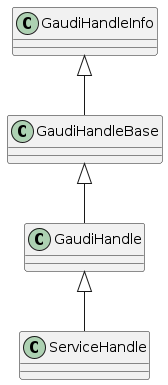
Gaudi provides two API for accessing a service:
SmartIFgeneral-purpose, low-level, bare-bone
ServiceHandlebetter control on Gaudi usage protocols such as
auto create/fetch the underlying service (lazily)
data race protection
metadata management: typeinfo, python, printing
exception handling
The usage is similar and both are:
Resource Handle in general sense
smart pointers with reference counting idiom
easy to use and can be mixed (better following one)
Recommendation: use ServiceHandle unless there is a reason not to.
5.2.1.1 Method 1 (with ServiceHandle)
// in header file: declare a data member in class definition
ServiceHandle<ITargetSvc> m_svc;

// in src file: intialize in constructor: (componentName, parentName)
// actual acquisition of the service happens lazily in the check step
MyClass::MyClass(const std::string &aName, ISvcLocator *aSvcLoc)
: GaudiAlgorithm(aName, aSvcLoc),
  m_svc("ServiceComponentName", aName) {}

// check validity in initialize()
if (!m_svc) {
  error() << "some error message" << endmsg;
  return StatusCode::FAILURE;
}

// ... use m_svc as a pointer
5.2.1.2 Method 2 (with SmartIF)
// in header file: declare a member in class definition
SmartIF<ITargetSvc> m_svc;

// in src file: create/fetch the service explicitly
// and check validity in initialize()
m_svc = service("ServiceComponentName");
if (!m_svc) {
  error() << "some error message" << endmsg;
  return StatusCode::FAILURE;
 }

// ... use m_svc as a pointer

/* or, access the service temporarily in GaudiAlgorithm */
auto m_svc = svc<ITargetSvc>("ServiceComponentName", create_if_noexist);
SmartIF has no inheritance.
5.2.2 Default Service Access
Some services are predefined and used as the default service implementation if user does not override.
These services are immediately available without user configuration.
Dedicated member methods are provided in Gaudi::Algorithm to access these services conveniently:
SmartIF<IAlgExecStateSvc>& Algorithm::algExecStateSvc() const { return get_svc_( m_aess, "AlgExecStateSvc" ); }
SmartIF<IAuditorSvc>&      Algorithm::auditorSvc() const { return get_svc_( m_pAuditorSvc, "AuditorSvc" ); }
SmartIF<IChronoStatSvc>&   Algorithm::chronoSvc() const { return get_svc_( m_CSS, "ChronoStatSvc" ); }
SmartIF<IDataProviderSvc>& Algorithm::detSvc() const { return get_svc_( m_DDS, "DetectorDataSvc" ); }
SmartIF<IConversionSvc>&   Algorithm::detCnvSvc() const { return get_svc_( m_DCS, "DetectorPersistencySvc" ); }
SmartIF<IDataProviderSvc>& Algorithm::eventSvc() const { return get_svc_( m_EDS, "EventDataSvc" ); }
SmartIF<IConversionSvc>&   Algorithm::eventCnvSvc() const { return get_svc_( m_ECS, "EventPersistencySvc" ); }
SmartIF<IHistogramSvc>&    Algorithm::histoSvc() const { return get_svc_( m_HDS, "HistogramDataSvc" ); }
SmartIF<INTupleSvc>&       Algorithm::ntupleSvc() const { return get_svc_( m_NTS, "NTupleSvc" ); }
SmartIF<IRndmGenSvc>&      Algorithm::randSvc() const { return get_svc_( m_RGS, "RndmGenSvc" ); }
SmartIF<IToolSvc>&         Algorithm::toolSvc() const { return get_svc_( m_ptoolSvc, "ToolSvc" ); }
SmartIF<IExceptionSvc>&    Algorithm::exceptionSvc() const { return get_svc_( m_EXS, "ExceptionSvc" ); }
SmartIF<IAlgContextSvc>&   Algorithm::contextSvc() const { return get_svc_( m_contextSvc, "AlgContextSvc" ); }
SmartIF<ITimelineSvc>&     Algorithm::timelineSvc() const { return get_svc_( m_timelineSvc, "TimelineSvc" ); }
SmartIF<IHiveWhiteBoard>&  Algorithm::whiteboard() const { return get_svc_( m_WB, "EventDataSvc" ); }
5.3 TODO Event Data Access
The following is technical details.
5.3.1 Access Checklist
Do not delete objects that you have registered.
Do not delete objects that are contained within an object that you have registered.
Do not delete objects which you got from the store via findObject() or retrieveObject().
Do delete objects which you create on the heap, i.e. by a call to new, and which you do not register into
a store.
5.3.2 Object Key
Default RootName: ‘/Event’
PodioInput put collections under: ‘/Event’, it’s hardcoded
RootNode is special
Write Mode: corret name/Path:
name/Path |
internal |
ROOT file |
XXX/YYY |
/Event/XXX/YYY |
YYY |
/XXX/YYY |
/XXX/YYY |
YYY |
/XXX |
invalid |
READ Mode: corret name/Path:
name/Path |
internal |
ROOT file |
XXX |
/Event/XXX |
XXX |
XXX/YYY |
/Event/XXX/YYY |
invalid |
/XXX/YYY |
/Event/YYY |
YYY |
/XXX |
invalid |
5.4 Random number service
Basic picture:
random engine generates random number in a flat distribution in (0, 1)
it’s the most basic stuff, thus called ‘engine’
random generator uses a random engine to produce all types of probability distribution
random service provides an interface for end users configuring and using the engine or the generator
5.5 RndmGenSv
This is the default service for random number generation in Gaudi.
It is created automatically (without user configuration), in a lazy way, i.e. created when used.
It’s based on CLHEP’s random number implementation.
5.5.1 Use in Algorithm development
Most of the time, user only needs to know how to use the random generator when developing his/her algorithm.
// random service is directly available by member function:
randSvc();

// 1. by generator interface
auto gen = randSvc()->generator( Rndm::Gauss( 0.5, 0.2 ) );
auto value = gen->shoot();
// or array
gen->shootArray(vector_values, number);

// 2. by number interface (a wrapper of generator)
Rndm::Numbers exponential( randSvc(), Rndm::Exponential( 0.2 ) );
hist->Fill(exponential());

// or initialize it later
Rndm::Numbers exponential;
exponential.initialize( randSvc(), Rndm::Exponential( 0.2 ) );
5.5.2 Configuration in Job option
The default engine is HepRndm::Engine<CLHEP::Ranlux64Engine> with fixed seed number ‘1234567’.
Engine can be customized in job option.
# 1. Just change the engine type
from Configurables import RndmGenSvc

rdmSvc = RndmGenSvc("RndmGenSvc") # default name for auto-recognizing
rdmSvc.Engine = "HepRndm::Engine<CLHEP::HepJamesRandom>"

AppMgr.ExtSvc +=[rdmSvc]

# 2. Also customized the engine params
from Configurables import HepRndm__Engine_CLHEP__HepJamesRandom_

rdmEngine = HepRndm__Engine_CLHEP__HepJamesRandom_("RndmGenSvc.Engine") # default name for auto-recognizing
rdmEngine.SetSingleton = True
rdmEngine.Seeds = [5685]

AppMgr.ExtSvc +=[rdmEngine]

# optional: pass the name to rdmSvc for correct messaging
rdmSvc.Engine = rdmEngine.name()
5.5.3 List of engines
// /home/yong/src/physics/key4hep/Gaudi/GaudiSvc/src/RndmGenSvc/HepRndmEngines.cpp
  HepRndm::Engine<DualRand>
  HepRndm::Engine<TripleRand>
  HepRndm::Engine<DRand48Engine>
  HepRndm::Engine<Hurd160Engine>
  HepRndm::Engine<Hurd288Engine>
  HepRndm::Engine<HepJamesRandom>
  HepRndm::Engine<MTwistEngine>
  HepRndm::Engine<RanecuEngine>
  HepRndm::Engine<Ranlux64Engine>
  HepRndm::Engine<RanluxEngine>
  HepRndm::Engine<RanshiEngine>
5.5.4 List of generators
// /home/yong/src/physics/key4hep/Gaudi/GaudiKernel/include/GaudiKernel/RndmGenerators.h
Rndm::Gauss;
Rndm::Exponential;
Rndm::Chi2;
Rndm::BreitWigner;
Rndm::Landau;
Rndm::BreitWignerCutOff;
Rndm::StudentT;
Rndm::Gamma;
Rndm::Poisson;
Rndm::Binomial;
Rndm::Flat;
Rndm::Bit;
Rndm::DefinedPdf;
Rndm::GaussianTail;
5.6 Class diagram
It’s possible to implement a new random number service. This diagram shows the implementation details.

6 Further reading
6.1 Reference projects
The following projects are examples built on top of key4hep software stack or using some of key4hep components.
In general, they provides a good reference for building next-generation HENP experiment-specific software.
6.1.1 EIC
EIC project has built a complete software stack based on key4hep components (mainly DD4hep and EDM4hep).
The following repositories are actively developed.
The project members are also contributors to several key4hep component package.
- NPDet
A collection of detector models for EIC, based on DD4hep
- EDM4eic
event data model based on PODIO and EDM4hep
- npsim
DD4hep plugins for EIC simulation
- EPIC
Complete detector model of EIC experiment
- Juggler
EIC software for prototype study. Based on Gaudi, still actively developed.
- EICrecon
EIC official software based on JANA2
algorithms migrated from Juggler to JANA2 in process
also depends on NPDET and EDM4eic
6.1.2 FCC
FCC (Future Circular Collider) is the next-generation high-performance particle collider.
FCC experiments have built a software `FCCSW <https://github.com/HEP-FCC/FCCSW>`_, which is:
one of the first experiments built on top of
key4hepthe project also develops
k4FWCoreandk4SimGeant4.
Its code bases are kept in pace with latest development of
key4hep.`CEPCSW<https://github.com/cepc/CEPCSW>`_ has very much the same design asFCCSW
6.2 More about Gaudi
The official documentation is a combination of legacy compatibility and latest development. But it provides a very nice overview of the architecture design and key building blocks. Not needed for end user, recommend for average developer, a must read for software builder/maintainer.
An anatomy of Gaudi architecture (based on personal learning note) can be found here.
6.3 Others
6.3.1 Software management
6.3.2 Modern C++
Cheatsheat of using modern C++
中文学习笔记以及示例代码,作者其它的笔记也值得一读
C++ Rvalue References Explained
what, how, why of move and perfect forward
-
all the best practices of using modern C++
Maybe the ultimate source of reference?